Understanding RAG: A Practical Guide for Engineers - Part 2: Vectors, Embeddings, and How RAG Actually Works

Part 1 covered what RAG is and why it matters. Now let’s get into the mechanics - what vectors actually are, how embeddings capture meaning, and how the pieces fit together.
This is the explanation I needed when I started. Technical enough to be useful, without assuming a background in machine learning.
Vectors Are Just Lists of Numbers
That’s it. When someone says “embedding vector,” they mean something like:
[0.23, -0.15, 0.87, 0.42, -0.63, 0.91, ...]These lists typically have hundreds or thousands of numbers (1536 or 3072 for modern embedding models), but conceptually it’s just a list.
Why Numbers Instead of Text?
Computers can’t “understand” text the way we do. When you read “authentication,” you instantly know what it means and how it relates to other concepts - login, OAuth, security, tokens. Computers need a different representation.
Vectors are how we represent meaning as numbers. Each position in the list captures some aspect of meaning. The details of what each number represents are learned during training, but the key insight is simple:
Similar meanings → similar numbers
"authentication"     → [0.8, 0.2, 0.1, 0.15, ...]
"login"              → [0.75, 0.25, 0.12, 0.18, ...]  ← Close to "authentication"
"OAuth"              → [0.72, 0.28, 0.09, 0.16, ...]  ← Also close
"database schema"    → [0.1, 0.05, 0.9, 0.82, ...]    ← Very different
Measure the mathematical distance between these vectors and “authentication” and “login” are close together. “Authentication” and “database schema” are far apart. This is how computers represent that “authentication” and “login” are related but “authentication” and “database schema” aren’t.
The Technical Term: Embeddings
Converting text into these number vectors is called “embedding,” and the resulting vector is an “embedding.”
Models like OpenAI’s text-embedding-3-small are trained on billions of documents to learn these representations. You send text, they return a vector:
Input:  "POST request requires authentication token"
Output: [0.023, -0.145, 0.872, ..., 0.234]  # 1536 numbers
The model learned these representations by reading massive amounts of text and learning which words and phrases tend to appear in similar contexts. Words that appear in similar contexts get similar vectors.
How Vectors Enable Semantic Search
This is where it gets useful.
Traditional Keyword Search
Document: "POST /api/auth requires Bearer token in Authorization header"
Query:    "authentication POST endpoint"

Match? YES - contains "authentication" and "POST"
Document: "POST /api/auth requires Bearer token in Authorization header"
Query: "How do I login to the API?"
Match? NO - doesn't contain "login" or "API"Traditional search looks for exact word matches. Different words, no match - even if the meaning is identical.
Vector/Semantic Search
Document: "POST /api/auth requires Bearer token in Authorization header"
→ Vector: [0.34, 0.12, 0.89, ...]

Query: "How do I login to the API?"
→ Vector: [0.36, 0.14, 0.87, ...]

Distance between vectors: SMALL (similar meaning)
Match? YES ✓
The vectors for “POST /api/auth requires Bearer token” and “How do I login to the API?” are mathematically similar, even though the words are different. The system understands they’re asking about the same thing.
This is what makes RAG work. It doesn’t match words - it matches meaning.
The Three Stages of RAG
Now let’s walk through exactly how RAG works. Understanding this helps you evaluate systems and understand where they fail.
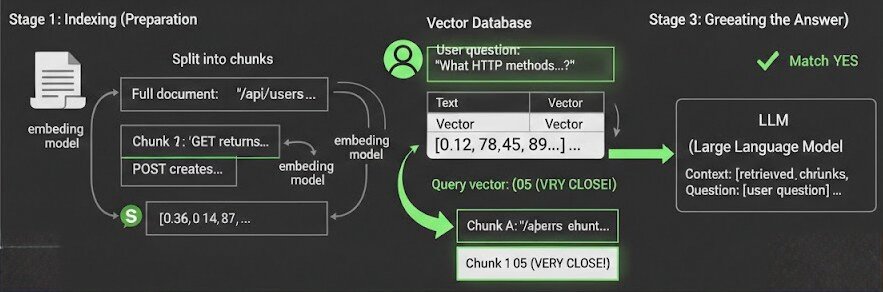
Stage 1: Indexing (Preparation)
This happens once when you set up your RAG system.
Step 1: Split documents into chunks
Full document: "The /api/users endpoint accepts GET and POST requests.
                GET returns user list. POST creates new user with
                email and name fields required..."

Split into chunks:
- Chunk 1: "The /api/users endpoint accepts GET and POST requests."
- Chunk 2: "GET returns user list."
- Chunk 3: "POST creates new user with email and name fields required."
Why chunk? You can’t feed entire documents to the LLM (context limits), and smaller chunks give more precise retrieval.
Step 2: Convert each chunk to a vector
Chunk: "The /api/users endpoint accepts GET and POST requests"
  ↓ (send to embedding model)
Vector: [0.12, 0.45, 0.89, -0.23, 0.67, ...]  # 1536 numbers
Step 3: Store in a vector database
Vector Database:
┌─────────────────────────────────────────────┬──────────────────────────┐
│ Text Chunk                                  │ Vector                   │
├─────────────────────────────────────────────┼──────────────────────────┤
│ "/api/users accepts GET and POST requests"  │ [0.12, 0.45, 0.89, ...]  │
│ "GET returns user list"                     │ [0.67, 0.23, 0.11, ...]  │
│ "POST creates user with email, name"        │ [0.34, 0.78, 0.91, ...]  │
└─────────────────────────────────────────────┴──────────────────────────┘
Vector databases (Pinecone, Weaviate, Chroma, pgvector) are optimized for finding similar vectors quickly, even with millions of them.
Stage 2: Retrieval (Search)
This happens every time a user asks a question.
Step 1: Convert the question to a vector
User question: "What HTTP methods does the users endpoint support?"
  ↓ (send to same embedding model)
Query vector: [0.15, 0.43, 0.91, -0.21, 0.69, ...]
Step 2: Find the most similar vectors in the database
Query vector:     [0.15, 0.43, 0.91, ...]

Comparing to database:
Chunk A: [0.12, 0.45, 0.89, ...]  ← Distance: 0.05 (VERY CLOSE!)
Chunk B: [0.67, 0.23, 0.11, ...]  ← Distance: 0.82 (far)
Chunk C: [0.34, 0.78, 0.91, ...]  ← Distance: 0.54 (medium)

Return: Chunk A ("/api/users accepts GET and POST requests")
The vector database calculates the distance between the query vector and all stored vectors, then returns the closest matches.
Notice: the question was “What HTTP methods does the users endpoint support?” and the chunk says “/api/users accepts GET and POST requests” - different wording, but the vectors are nearly identical. The system understands they’re about the same thing.
Step 3: Return the top-k chunks
Usually you retrieve multiple chunks (k=3 to k=10), not just one, to give the LLM more context.
Stage 3: Generation (Creating the Answer)
Step 1: Build a prompt with the retrieved context
prompt = f"""
You are a helpful assistant. Answer the question based on the context below.

Context:
{retrieved_chunk_1}
{retrieved_chunk_2}
{retrieved_chunk_3}

Question: {user_question}

Answer:
"""
Step 2: Send to the LLM
Context: "/api/users accepts GET and POST requests. GET returns user list.
          POST creates user with email and name fields required..."

Question: "What HTTP methods does the users endpoint support?"

LLM generates: "The /api/users endpoint supports GET and POST requests.
                GET retrieves the user list, while POST creates a new user."
The LLM doesn’t “know” your API’s endpoints from its training. But because we retrieved that information and included it in the prompt, it can generate an accurate answer.
Understanding the Failure Modes
Now that you understand how RAG works mechanically, you can understand where it fails:
Bad chunking → Context gets split poorly → Important info spread across chunks → LLM doesn’t get complete picture
Poor embeddings → Similar concepts get different vectors → Relevant chunks aren’t retrieved → LLM has no context to work with
Wrong top-k value → Too few chunks (miss important context) or too many chunks (irrelevant info confuses LLM)
Outdated vector database → Someone updates a document but vectors aren’t updated → Old information gets retrieved
The retrieval quality determines everything. If you retrieve the wrong chunks, the best LLM in the world can’t save you.
Vector Databases You’ll Encounter
Now that you understand what vectors are and how they’re used, here are the options you’ll see:
Managed/Cloud:
- Pinecone - Easiest to get started, fully managed
- Weaviate Cloud - Good balance of features and ease
- Qdrant Cloud - Fast, good for large scale
Self-hosted:
- Chroma - Simple, great for prototyping
- Weaviate - Feature-rich, open source
- Milvus - Built for scale
- pgvector - Postgres extension (use what you know)
What to consider:
- Scale: How many vectors? (thousands vs. millions)
- Latency: How fast do queries need to be?
- Cost: Managed services charge by storage + queries
- Features: Filtering, metadata, hybrid search support
The Key Insights
If you’ve made it this far, here’s what should click:
-
Vectors are coordinates in a high-dimensional space. Similar meanings cluster together.
-
Embeddings capture semantic meaning. “Authentication” and “login” get similar vectors because they appear in similar contexts in training data.
-
Semantic search is finding nearby vectors. The math finds similar meaning, not similar words.
-
RAG is search + prompting. Find relevant chunks (retrieval), give them to the LLM (generation). No retraining.
-
Quality depends on retrieval. If you retrieve the wrong chunks, the whole system fails.
What’s Next
You now understand how RAG works mechanically - vectors, embeddings, the three stages, where failures happen.
But here’s what the tutorials don’t tell you: naive RAG isn’t good enough for production.
The basic version I just described typically achieves 50-60% accuracy. That’s not good enough for anything users depend on.
In Part 3, I’ll cover what actually matters when you’re building or evaluating RAG systems for real:
- Hybrid search: Why vector-only search fails and what to do about it
- Chunking strategies: The difference between 60% and 90% accuracy
- Evaluation metrics: How to measure quality objectively
- Data freshness: Handling updates without re-indexing everything
- Cost modeling: Why production costs surprise everyone
These are the details that separate a demo from something users trust.
Next: Part 3 - RAG in Production: What Actually Matters
I’m building Stache, an open-source RAG platform, and writing this series to share what I’ve learned. Connect on LinkedIn or check out the project on GitHub.